
Introduction of interesting TrueType font for Altium Designer PCB usage
Altium Designer uses Stroke type font for PCB texts. This text style might be less attractive than typical TrueType fonts e use in regular documents. ISO standard for technical drawing ISO 3098-5 defines lettering for text used in technical drawings. Below image presents example of such text:
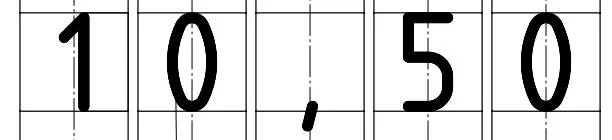
Standard ISO 3098-5 text sample
Fortunately there are existing fonts which corresponds to desired ISO 3098 standard lettering:
font Isonorm 3098 Regular,
font MISO Regular.
It is possible to install those fonts into Windows system and Altium can recognize those fonts when Altium Designer application starts.
Differences between Stroke and TrueType font in Altium Designer
Below image represents two font types used on PCB in Altium Designer:
font MISO on the left side with Text Height set to 2.5mm,
regular Stroke text with Text Height set to 1.35mm.
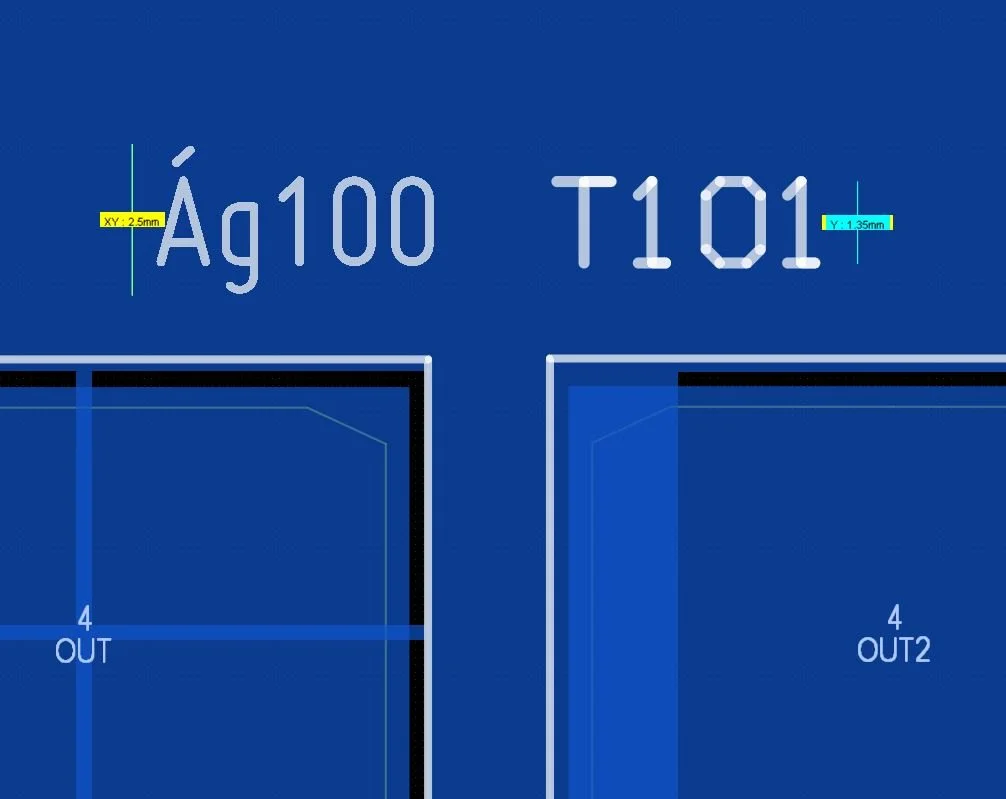
Comparison of TrueType font MISO (left) and regular Stroke type text (right)
Both fonts have equal relative height but set height is different. Why? This is because how text size is defined for Stroje type and TrueType font in Altium Designer:
Stroke type text height is defined from center line on bottom of the text to center line of top of the text. The actual ink on the board will be slightly larger than the path because Stroke is defined according to center lines.
TrueType font is defined from very bottom edge of the letters (e.g. letters “y”, “g“) to very top edge of the letters with diacritics (e.g. letters “Á“, “Š“).
Image above presents how size of the text in Stroke and TrueType is defined.